

Asynchronous work for remote teams is the practice of collaborating through documentation and recorded updates rather than real-time meetings. This guide shows you how to reclaim six hours of your week and eliminate burnout. You’ll learn to protect deep-work time and streamline decisions, ensuring your team delivers consistent results without the need for constant, draining supervision.
The clock is a hard master. Most companies try to fight it. They gather people on screens at the same hour and call it progress. It is not progress. It is noise. To do the work well, you must change the rules.
Asynchronous work for remote team success is about the written word. It is about moving forward without waiting for a reply. You document the task. You record the update. You leave the meeting behind. This is how the work gets done. It is clean, and it is efficient.
Master these steps to win back your hours, find your focus, and build a team that truly delivers.
Escaping the “Always-on” trap: how true async teams actually work?
Asynchronous work for remote team means your team communicates and delivers without needing to be online at the same time. Work advances through documented handoffs, recorded updates, and structured written communication, not scheduled meetings.
For remote teams, this is the difference between a team that is geographically distributed but still operating on a 9-to-5 synchronous clock and one that actually functions across time zones. Most companies confuse the two. They go remote, but keep every system synchronous. That’s where performance breaks down.
83% of workers report async work increases their productivity, compared to only 10.6% who say it decreases it, an 8-to-1 ratio in async’s favour. Yet 49% of organisations still do not actively encourage asynchronous communication.
The gap between knowing and implementing is where this guide lives.
Quick snapshot:
Async work is not “no meetings.” It is meetings reserved for decisions only; everything else moves through documentation. The single highest-impact change: stop scheduling update meetings. Turn them into written, searchable records. Teams that use async communication cut unnecessary meetings and save six hours per week per person. GP Strategies Implementation fails when norms aren’t written down. Culture doesn’t self-document. The genuine drawbacks, delayed conflict resolution, isolation risk, and decision lag, are real and require structural fixes, not encouragement.
Async vs. Synchronous: what CIOs and directors actually need to know
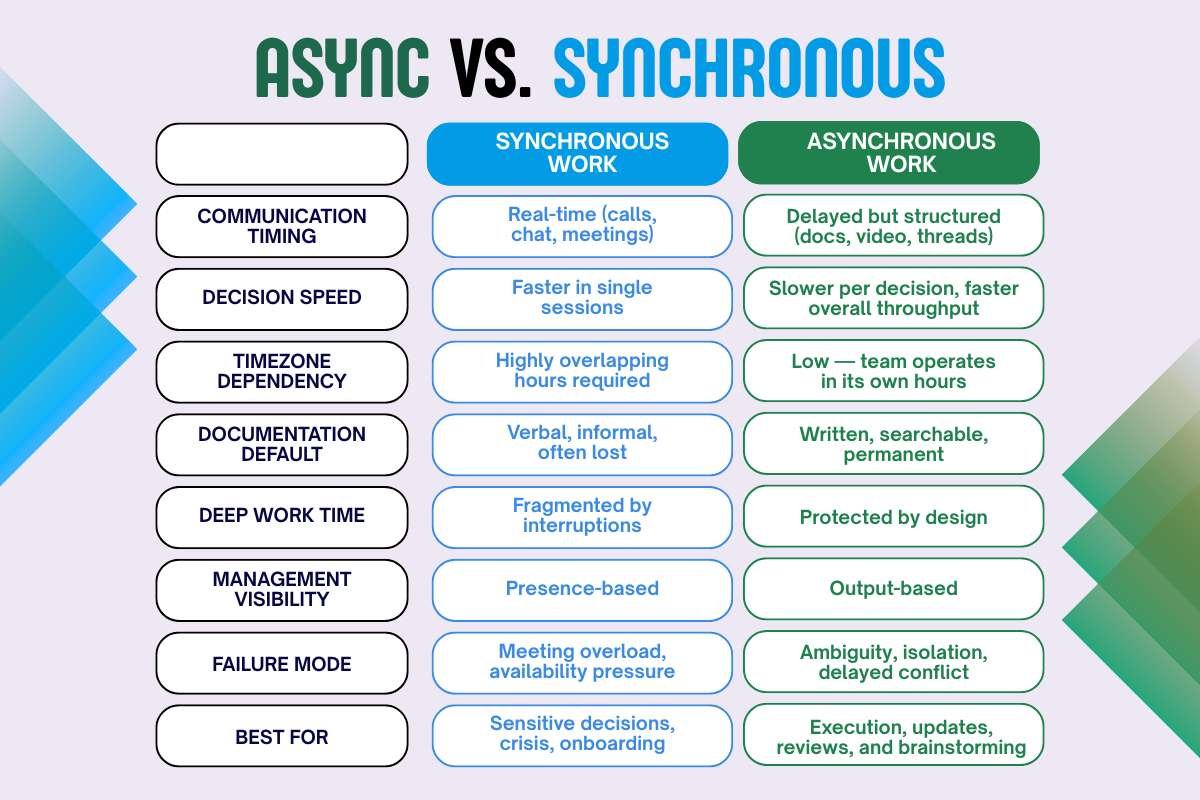
Most leadership frameworks treat async as a tool choice. It isn’t. It’s an operating decision that changes how accountability, documentation, and decision-making work across the entire organisation.
| Synchronous Work | Asynchronous Work | |
| Communication timing | Real-time (calls, chat, meetings) | Delayed but structured (docs, video, threads) |
| Decision speed | Faster in single sessions | Slower per decision, faster overall throughput |
| Timezone dependency | Highly overlapping hours required | Low — team operates in its own hours |
| Documentation default | Verbal, informal, often lost | Written, searchable, permanent |
| Deep work time | Fragmented by interruptions | Protected by design |
| Management visibility | Presence-based | Output-based |
| Failure mode | Meeting overload, availability pressure | Ambiguity, isolation, delayed conflict |
| Best for | Sensitive decisions, crisis, onboarding | Execution, updates, reviews, and brainstorming |
Interruptions in synchronous environments cost more than the meeting itself — research from UC Irvine found it takes over 20 minutes to return to deep work after a single disruption. Multiply that across a team of 20, and the productivity loss is structural, not incidental.
Read More: Asynchronous vs Synchronous Work
What competitors don’t tell you?
GitLab’s handbook, Stack Overflow’s guide, and Forbes’s coverage all explain what async is. None of them gives CIOs the failure rate data or the role-specific rollout framework. Here is what the research actually shows and what most implementations get wrong:
The #1 reason async fails is not tool adoption. It is the absence of written norms.
High-performing teams are 2.7 times more likely to have documented communication guidelines than low-performing ones. The tool doesn’t create the culture. The documented expectations do. Companies that roll out Notion, Loom, or Slack and call it “async-first” without writing down response time expectations, decision rights, and communication defaults will see the same meeting overload repackaged into chat pings.
The second failure point is invisible to most leaders: decision lag under pressure.
When a project hits a blocker at 4 PM in one timezone, and the decision-maker is offline for 10 hours, teams develop workarounds — informal chat, scope creep, or waiting and losing momentum. The fix is documented decision authority, not faster response times. Every project needs a decision log and a named decision owner who can move without escalation.
Step-by-step implementation guide for directors and CIOs

This is a sequenced rollout. Do not skip Phase 1 to get to tools faster.
Phase 1: Audit (Week 1–2)
Goal: Understand your current synchronous load before changing anything.
- Count total recurring meetings per team per week. Categorise each as: update, decision, relationship, or work session.
- Identify which meetings could be replaced by a written or recorded update.
- Measure: what percentage of your team’s day is already protected as deep-work time?
- 22% of knowledge workers say “this meeting should have been an email” happens to them daily. 40% say weekly. Your audit will confirm which category your team falls into.
Phase 2: Write the norms (Week 2–3)
Goal: Document the rules before deploying tools.
Write a one-page communication charter that answers:
- What requires a meeting? (Default answer: decisions and sensitive conversations only)
- What is the expected response time for async messages? (Recommended: 4 hours within a working day)
- Where does each type of communication live? (Decisions → Notion or Confluence; Updates → Loom or Slack threads; Deep work artefacts → Docs)
- What is the escalation path if a blocker needs a same-day decision?
This document does more for async adoption than any tool purchase. Make it public, versioned, and editable.
Phase 3: Replace updates first (Week 3–4)
Goal: Eliminate the lowest-value synchronous meetings.
The easiest and highest-ROI change: replace all status update meetings with a structured async format. Each team member posts their update once per day in a shared doc or channel using this three-line format:
Done: [what was completed] Next: [what’s planned] Blocker: [what needs a decision or input]
The manager reads, responds async, and escalates blockers — no meeting required. 61% of employees say async communication helps them achieve better work-life balance. This single change is where most teams feel the shift immediately.
Phase 4: Deploy tools with purpose (Week 4–6)
Goal: Match tool to function, not tool to hype.
| Function | Tool Options | Why Async-Native |
| Long-form documentation | Notion, Confluence | Searchable, versioned, permanent record |
| Video updates & walkthroughs | Loom, Loom for Business | Replaces meeting; watchable at 1.5x speed |
| Project tracking | Linear, Asana, Jira | Status is visible without status meetings |
| Written discussion threads | Slack (thread-only mode) | Forces context, reduces ping culture |
| Decision logging | Notion, Coda | Named owner, date, options considered, outcome |
| Shared availability | Calendly, World Time Buddy | Eliminates the “when are you free?” meeting |
Loom users recorded 88 million videos in 2024, replacing an estimated 202 million meetings — each async video eliminates more than two live meetings because a single recording is viewable by multiple people without rescheduling.
Phase 5: Protect deep work by policy (Week 6–8)
Goal: Make focus time structurally protected, not individually negotiated.
- Introduce “no meeting blocks” — minimum 3 hours per day, consistent across the team, non-negotiable.
- Require meeting agendas 24 hours in advance. If no agenda exists, the meeting doesn’t happen.
- Standardise meeting lengths: 25 minutes or 50 minutes only. Remove the default 60-minute calendar slot.
- Make all meetings opt-in with a shared written record for those who don’t attend.
Phase 6: Measure and adjust (Month 2+)
Track these metrics monthly:
| Metric | What It Measures | Target |
| Meetings per person per week | Synchronous load | Reduce by 30% in 90 days |
| % of decisions with a written log | Documentation culture | >80% by Month 3 |
| Average response time to async messages | Communication health | Under 4 hours |
| Employee deep-work hours per week | Focus time | Increase by 2–4 hours |
| Blocker resolution time | Async bottleneck indicator | Under 24 hours |
Know More: Why Does Asynchronous Management Works Better for Modern Teams?
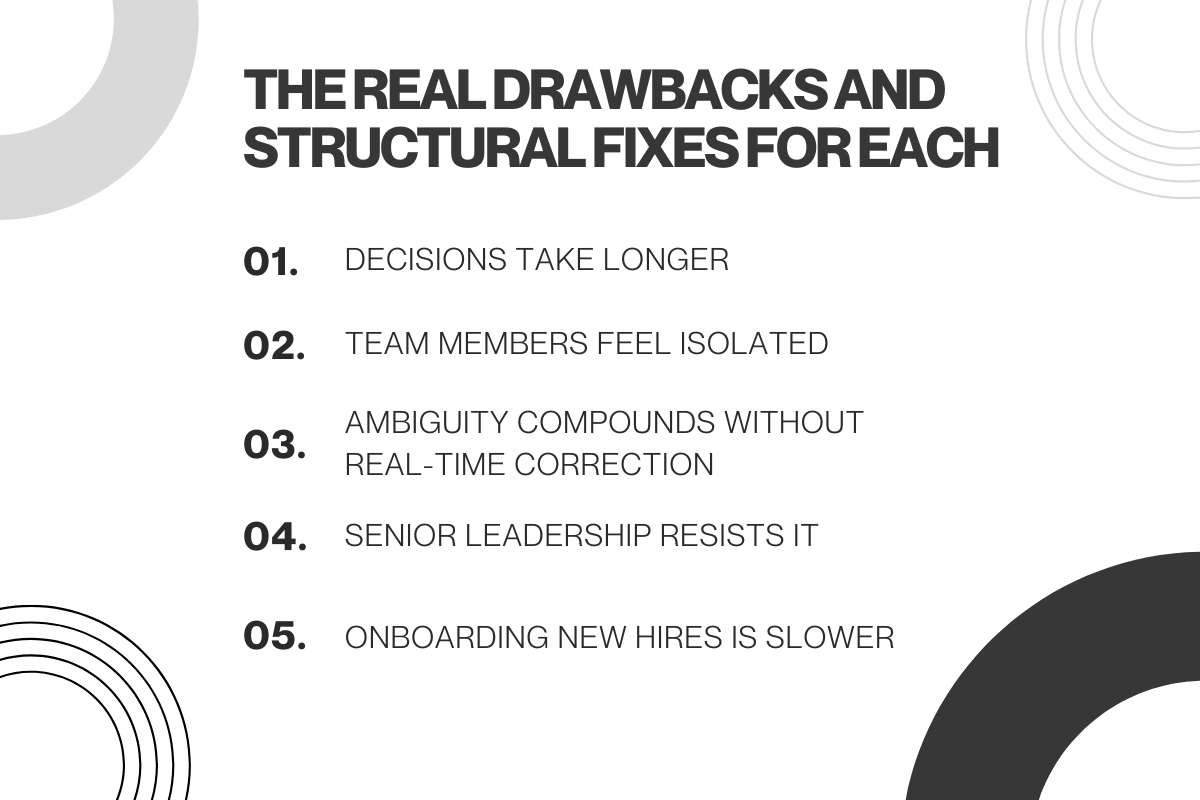
The real drawbacks and structural fixes for each
Every competitor article lists drawbacks. None provides the fix at the same level of specificity.
Drawback 1: decisions take longer
Why it happens: No decision owner, no deadline, no escalation path. Fix: Every project doc names a decision owner. Every open question has a 48-hour resolution deadline. After 48 hours, the decision owner decides based on the available information.
Drawback 2: team members feel isolated
Why it happens: Async removes informal touch-points — hallway conversations, small talk, shared laughter. Gallup’s 2024 State of the Global Workplace report found 44% of global workers face daily stress, and 77% are not engaged at work — isolation accelerates both. Fix: Protect one synchronous ritual per week that is not work; a 30-minute optional video coffee, a shared Slack thread for non-work topics, a monthly team retrospective that includes personal check-ins.
Drawback 3: Ambiguity compounds without real-time correction
Why it happens: A misunderstood brief in a synchronous meeting gets corrected in 30 seconds. The same misunderstanding in async can cost a full day of misdirected work. Fix: Require a written brief for every task over 2 hours. Format: context, expected output, acceptance criteria, deadline. If the brief takes 5 minutes to write, the work takes 5 fewer wrong-direction hours.
Drawback 4: Senior leadership resists it
Why it happens: 85% of leaders struggle to feel confident that hybrid/remote employees are productive — async removes the visual presence cues that managers have relied on for performance assessment. Fix: Shift performance review from presence and availability to output and impact. Define what “done” looks like for every role before async rollout begins. Measurement replaces observation.
Drawback 5: Onboarding new hires is slower
Why it happens: Async assumes institutional knowledge is documented. New hires need real-time guidance to ramp up quickly. Fix: Keep the first 30 days hybrid-synchronous for new hires regardless of the team’s default async posture. Assign a synchronous onboarding buddy with daily 30-minute check-ins for the first two weeks. Async-first is a steady-state model, not a first-week model.
What the data says about outcomes?
Companies save an average of $11,315 per year per part-time remote worker through reduced office expenses, lower turnover, and improved efficiency.
The U.S. Bureau of Labor Statistics finds that a one-percentage-point rise in remote workers correlates with a 0.08 percentage-point increase in total factor productivity — a statistical association that supports the economic case for async-enabled remote structures.
78.6% of async workers in fully async companies report feeling highly connected to their team — higher than hybrid or in-office arrangements — disproving the assumption that async inherently damages team cohesion when implemented with deliberate social rituals.
FAQ
What is asynchronous work for remote teams?
Asynchronous work means team members communicate and complete tasks without requiring simultaneous online presence. Work advances through documented messages, recorded video updates, and structured written handoffs rather than scheduled meetings. It is the operational default for teams spread across multiple time zones.
How do you implement async work without losing team cohesion?
Protect one weekly synchronous ritual unrelated to work, a virtual coffee or team check-in. Require a written brief for every significant task. Document all decisions with a named owner and date. The research shows that teams with documented communication guidelines outperform those without by 2.7 times. Cohesion comes from clear expectations, not constant availability.
What’s the difference between async-remote and just working from home?
Working from home on a synchronous schedule, logging into Zoom at 9 AM, responding to Slack instantly, and attending four video calls per day is remote but not async. Async work means your operating model does not require simultaneous presence. The location is irrelevant; the communication protocol is what defines the model.
What should never be handled asynchronously?
Performance feedback (especially critical feedback), conflict resolution between team members, crisis response, and the first week of onboarding for new hires. These require real-time human presence. Async is not a one-size-fits-all model — it is the default, with synchronous reserved for the situations where it genuinely outperforms it.
Sources:
- Timeeting, 47 Asynchronous Work Statistics for 2026 — timeeting.com
- Stack Overflow Blog, Building a Collaborative Asynchronous Work Environment — stackoverflow.blog
- GitLab Handbook, How to Embrace Asynchronous Communication for Remote Work — handbook.gitlab.com
- Gallup, State of the Global Workplace 2024 — gallup.com
- U.S. Bureau of Labor Statistics, Productivity and Remote Work — bls.gov
- McKinsey & Company, Hybrid Work Analysis 2025 — mckinsey.com
- Great Place To Work, Remote Work Productivity Study 2024–2025 — greatplacetowork.com